
Merging projects is a feature within ApexSec that allows you to combine multiple ApexSec projects into one combined project that includes all the Developer Comments and False Positives.
A common scenario in which this is useful is when two developers have worked on separate areas within a single APEX application. They have added Developer Comments, or marked some issues as False Positive, but now have 2 copies of the ApexSec project file. By merging the ApexSec projects, the developers can combine their efforts into a single ApexSec project file.
To perform this action through the command line you have to enter the following terminal command:
java -jar apexsec-win32.jar -n SomeProject.apexsec Merge1.apexsec Merge2.apexsec Merge3.apexsec
(Any number of projects can be merged; in the above example Merge1, Merge2 and Merge3 and merged into the SomeProject.apexsec file)
The same can be performed through the GUI using the Merge Project(s) option:
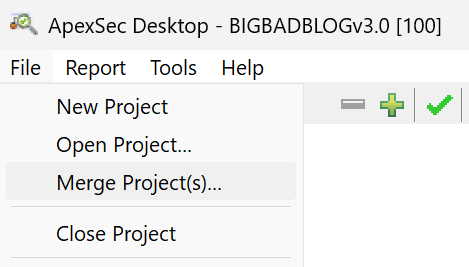
The selected file ApexSec project file will be merged into the currently open project. You must then save the project.